
Podcast: Play in new window | Download
Subscribe: Apple Podcasts | RSS
Read below to learn more about Run Charts, or head over here to download a free run chart template that you can use today.
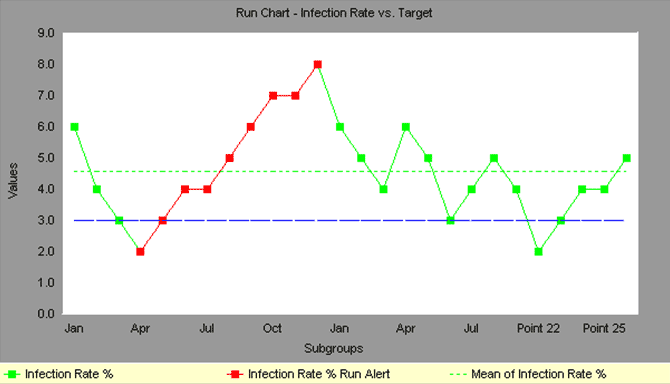
Run Charts, also known as line graphs, display process performance over time. Run Charts Six Sigma, as sometimes they called, are one of the primary quality tools used in process improvement.
This post will explain “What is a Run Chart?”, show an example, and provide a video tutorial on how to create a Run Chart in Excel.
Upward and downward trends, cycles, and large aberrations may be spotted and investigated further. In a run chart, events, shown on the y axis, are graphed against a time period on the x axis.
For example, a run chart in a hospital might plot the number of patient transfer delays against the time of day or day of the week. The results might show that there are more delays at noon than at 3 p.m. Investigating this phenomenon could point to potential improvement needs.
Run charts can also be used to track improvements that have been put into place, checking to determine their success. For example, a Before/After chart can be displayed as a run chart.
Also, an average line can be added to a run chart to clarify movement of the data away from the average.

Become a Lean Six Sigma professional today!
Start your learning journey with Lean Six Sigma White Belt at NO COST


Leave a Reply